



Forty-five percent of AI-generated code samples ship at least one OWASP Top 10 vulnerability, according to Veracode’s 2026 GenAI code security research, and that rate has barely budged year over year even as models got better at writing syntactically clean code. An AI code security audit is the structured process of scanning, testing, and manually reviewing code written by tools like GitHub Copilot, Cursor, or Claude Code before it reaches production, using a sequence of checks: secrets detection, static analysis, dependency review, dynamic testing, manual authorization review, SBOM generation, and continuous re-scanning.
This guide walks through seven audits in the order a solo developer or small team can actually run them, in an afternoon, without hiring a security consultant or buying an enterprise platform.
What Is an AI Code Security Audit, Exactly?
An AI code security audit is not a single scan. It’s a layered sequence of checks designed to catch the specific failure modes that generative models introduce: confident but wrong dependency names, copy-pasted authorization logic that ignores your actual permission model, and credentials baked directly into example code because the model saw thousands of tutorials that did the same thing.
Traditional code review assumes a human wrote the logic and understood the intent behind it. AI-assisted pull requests break that assumption. Research from Apiiro found that AI-assisted pull requests carry measurably more issues than human-only ones, with privilege-escalation paths rising sharply as AI adoption increased. The model optimizes for “does this run,” not “is this safe,” and those are different questions.

Why Security Risks of AI Generated Code Differ From Ordinary Bugs
Ordinary bugs are variance. Security risks of AI generated code are systematic, because every model trained on the same public codebases inherits the same bad habits from Stack Overflow answers and outdated tutorials. That’s a structural problem, not a random one.
Three patterns show up repeatedly. First, models default to the simplest working solution, which usually means the least secure one, string-concatenated SQL instead of parameterized queries, for example. Second, models generate import statements for packages that don’t exist. A USENIX Security study covering 2.23 million AI-generated code samples found that 19.7% referenced at least one hallucinated package, and 43% of those invented names reappeared consistently across repeated runs, which is exactly the pattern attackers exploit through slopsquatting: registering the fake package name the model keeps suggesting and waiting for someone to install it.
Third, models rarely implement authorization correctly on the first pass because access control depends on business context the model never had. That’s why broken access control has held the top spot in the OWASP Top 10:2025, with the standard reporting that 100% of tested applications showed some form of the flaw.
Vibe Coding Security Risks You Can’t Ignore
Vibe coding, describing your intent in plain language and letting the assistant write the implementation, moves fast precisely because it skips the friction that normally forces a developer to think about edge cases. That speed is the risk. When nobody types out the SQL query by hand, nobody pauses to ask whether user input needs sanitizing.
Vibe coding security risks concentrate around three things: dependency sprawl, since a single prompt session can add a dozen new packages without anyone tracking them; secrets leakage, because models trained on public repos have absorbed thousands of examples with API keys sitting in plain text; and business logic gaps, since the model has no idea that your refund endpoint should check order ownership before processing. None of these show up as a syntax error. They show up as a breach three weeks later.
Prerequisites Before You Start the Audit
Get these in place before running any of the seven audits below:
A version-controlled repository with the AI-generated code committed, not just pasted into a local file
Command-line access or CI pipeline permissions to install scanning tools
A list of every AI assistant used on the project, since Claude Code, Cursor, and ChatGPT-generated snippets each carry slightly different risk profiles worth tracking separately
At least one person who understands the application’s actual authorization model, because no scanner can verify business logic it doesn’t understand
A staging environment that mirrors production closely enough to run dynamic tests safely
Skip any of these and you’ll either run audits against the wrong artifact or burn hours debugging false positives that a proper environment would have avoided.
How to Audit AI Generated Code: The 7-Step Process
1. Run a Secrets and Hardcoded Credentials Scan First
Outcome: every hardcoded credential, API key, or token gets flagged before the code moves further down the pipeline.
Do this step before anything else, because a leaked key in your git history stays exploitable even after you delete the line from the current file. Tools like Gitleaks and TruffleHog scan both the working tree and the full commit history for patterns that match API key formats, database connection strings, and private key headers. Point either tool at your repository root and let it walk the entire history, not just the latest commit.
Models frequently generate placeholder credentials that look real, and developers frequently forget to swap them out before pushing. Catching hardcoded credentials at this stage costs minutes. Catching them after a breach costs considerably more.
2. Apply SAST Tools for AI Code Before Anything Ships
Outcome: line-level detection of injection flaws, insecure crypto usage, and unsafe deserialization inside the AI-written code itself.
SAST tools for AI code analyze source without executing it, tracing data flow from user input to dangerous sinks. Semgrep and CodeQL both support custom rule sets tuned to catch patterns models repeat often, like building SQL queries through string formatting instead of parameterized statements. Run the scan against every file the assistant touched, not just new files, since AI tools frequently modify existing code when asked to “improve” a function.
SQL injection remains one of the most common findings in these scans precisely because models learned from decades of tutorial code that never mentioned parameterization. Set your SAST tool to fail the build on high-severity findings rather than just flagging them, otherwise the report gets ignored under deadline pressure.
A table in a PDF can break a RAG pipeline once it’s converted to text. Vultr’s newly VultronRetriever models index pages as images to preserve visual structure. Ranked highly on ViDoRe V3, run them locally or through Vultr Serverless Inference today.
3. Check Dependencies for Hallucinated Packages and Known CVEs
Outcome: a clean list of every package the AI added, verified against real registries and known vulnerability databases.
This is where software composition analysis, or SCA, earns its place in the workflow. Run OWASP Dependency-Check, Snyk, or Socket.dev against your manifest file immediately after any AI coding session that touched package.json, requirements.txt, or a similar dependency file. These tools cross-reference every package name against the actual registry and flag anything suspicious, newly published, low download counts, or names that don’t resolve at all.
The hallucinated dependency problem deserves its own line item because it’s unique to generative tools. No human developer accidentally imports a package that has never existed. Models do it because they generate plausible-looking names statistically, not by checking a registry. Treat any unresolved import as a hard stop, not a warning, since installing it blind is how slopsquatting attacks succeed.
4. Run DAST Against a Live Build to Catch Runtime Flaws
Outcome: confirmation that the application behaves securely under real HTTP requests, not just that the source code looks clean.
Dynamic application security testing complements SAST by attacking a running instance the way a real adversary would. OWASP ZAP or Burp Suite can crawl your staging deployment and throw malformed inputs at every endpoint, surfacing issues that static analysis misses entirely, like a broken access control path that only appears when two specific query parameters combine in an unexpected way.
Run DAST after SAST and dependency checks pass, since there’s no point stress-testing a build that still has an unpatched known CVE sitting in a library. Budget at least an hour for a mid-sized API, longer for anything with a complex authentication flow.
5. Manually Review Authorization and Business Logic
Outcome: confirmed alignment between what the AI-generated code enforces and what your actual permission model requires.
No scanner catches this reliably. Automated tools verify that an access control check exists, not that it enforces the correct rule for your specific business context. A human reviewer needs to trace every endpoint the AI touched and ask a blunt question: can a logged-in user reach data or actions that belong to someone else?
This step takes the most time and gets skipped the most often, which is exactly why it belongs in the audit rather than left to hope. Pull up every API route the assistant generated and manually test it with a lower-privilege account. If the AI wrote a “get invoice” endpoint, log in as User A and try requesting User B’s invoice ID directly. This single test catches an enormous share of real-world broken access control incidents.
6. Generate an SBOM for Every AI-Assisted Build
Outcome: a machine-readable inventory of every component in the build, giving you a documented baseline to detect supply chain attacks later.
A software bill of materials, built in the CycloneDX standard originally developed inside OWASP, captures every direct and transitive dependency along with license and version data. Generate one automatically as part of your build pipeline using a tool like Syft or cdxgen rather than compiling it by hand, since AI-assisted sessions tend to add dependencies faster than manual tracking can keep up.
The SBOM matters most after the audit, not during it. When a dependency you approved six months ago turns out to carry a newly disclosed vulnerability, the SBOM tells you instantly whether it’s in your build and where.
7. Schedule Continuous Re-Audits, Not a One-Time Check
Outcome: an ongoing gate that catches drift as models update, dependencies age, and new CVEs get disclosed against packages you already approved.
A single audit is a snapshot. AI code vulnerability scanning tools need to run on a schedule because the risk surface moves even when your code doesn’t. A package that was safe last month can carry a disclosed vulnerability today. Wire secrets scanning and SAST into your CI pipeline so they run on every pull request, and schedule SCA and SBOM regeneration weekly at minimum.
Treat this step as the difference between a checklist for reviewing AI generated code before deployment and an actual security posture. The checklist gets you through one release. The re-audit cadence keeps you covered through the next twenty.
Quick Reference: Matching Each Audit to the Right Tool
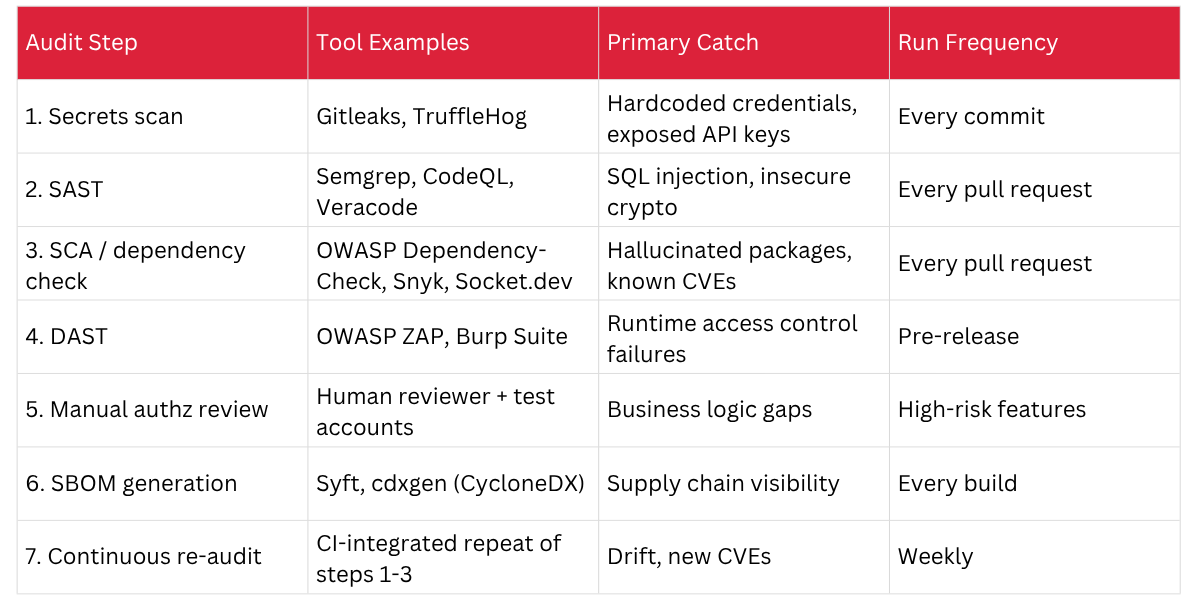
Is AI Generated Code Safe to Use in Production?
It can be, but only after it passes through this kind of layered review, not straight from the assistant’s output window. Treating an AI suggestion the same way you’d treat a junior developer’s first draft, worth reviewing, worth testing, not worth merging blind, sets the right expectation. The models keep improving, but the fundamental gap between “runs correctly” and “runs securely” hasn’t closed. Carnegie Mellon research cited in industry analysis found a wide split between features that function correctly and features that meet basic security standards, which is the entire reason this seven-step process exists rather than a single scan.
When Automated Audits Aren’t Enough
Don’t assume a clean SAST and DAST report means the code is production-ready. Automated AI code vulnerability scanning tools are tuned for known patterns; they miss context-specific business logic flaws almost by definition, because they don’t know your business logic. If your application handles financial transactions, healthcare data, or anything with regulatory exposure, budget for a human security review on top of the automated steps, especially step five. Skipping the manual authorization check to save an afternoon is the single most common way teams end up explaining a breach to their board.
Building This Into a Habit, Not a One-Time Sprint
Run all seven audits once and you’ll catch the obvious problems sitting in your current codebase. Run them on a schedule and you build an actual AI code security audit habit, one that scales as your team ships more AI-assisted code and adopts new assistants. Start with steps 1 through 3 today, they take under an hour combined for most repositories, then add DAST and the manual review before your next release. The cost of running this workflow is measured in hours. The cost of skipping it shows up later, usually at the worst possible time.
Frequently Asked Questions
What is an AI code audit?
An AI code audit is a structured review process that checks code written by AI assistants for security flaws, using a sequence of secrets scanning, static and dynamic testing, dependency verification, and manual logic review before the code reaches production.
What are the biggest security risks in AI generated code?
The biggest risks are broken access control, hardcoded credentials, and hallucinated dependencies that don’t exist in real package registries. These occur because models optimize for working code, not secure code, and lack context about your specific permission model.
How do I know if AI generated code is secure?
You can’t know from reading it alone. Run it through secrets scanning, SAST, SCA, and DAST, then manually test authorization logic with a lower-privilege account before treating it as production-ready.
What percentage of AI generated code contains security vulnerabilities?
Recent research puts the figure around 44 to 45 percent of AI-generated code samples containing at least one OWASP Top 10 vulnerability, a rate that has stayed roughly flat even as models improved at producing functional, syntactically correct code.
What are the most common vibe coding security risks?
The most common risks are dependency sprawl from unreviewed package additions, hardcoded secrets copied from training data patterns, and business logic gaps where the AI never understood the intended permission structure.
How do you audit AI generated code for security flaws?
Run secrets scanning, static analysis, dependency and hallucinated package checks, dynamic testing, manual authorization review, SBOM generation, and continuous re-scanning, in that order, before any AI-assisted code ships to production.
Can you trust AI generated code without a human review?
No. Automated scanners catch known patterns but miss business-context flaws like broken access control specific to your application, which is why a manual authorization review remains a required step, not an optional one.
What tools can scan AI generated code for vulnerabilities?
Common tools include Gitleaks and TruffleHog for secrets, Semgrep and CodeQL for SAST, OWASP Dependency-Check and Snyk for dependency risk, and OWASP ZAP or Burp Suite for dynamic testing.